
Can You Keep a Secret?
Here’s the challenge: You’re a SaaS vendor closing a deal with a major customer — but with one condition. Your product must run inside their AWS account. You want the deal. But that means your competitive advantage, the secret sauce that makes your product unique, is now deployed into an account you don’t control. It could be proprietary application logic or carefully crafted LLM prompts that took months to get right.
IAM policies won’t save you. Encryption at rest won’t either — not when the account administrator has access to the keys and can reach anything in their account. But there is a way to keep your secret …
EC2 Instance Attestation
AWS documentation describes attestation as
Attestation is a process that allows you to cryptographically prove to any party that only trusted software, drivers, and boot processes are running on an Amazon EC2 instance. Amazon EC2 instance attestation is powered by the Nitro Trusted Platform Module (NitroTPM) and Attestable AMIs.
Above doesn’t do a very good job of describing what this feature is good for. There are 2 major use-cases for attestation. First it can be used as evidence for an auditor to show instance has not been tampered and has a known configuration. The second case, which I focus on in this post, is that this evidence can be used in KMS key policy condition to allow or deny decryption of secrets. When this is combined with OS level security measures such as enhanced read-only file system (erofs) and device-mapper verity (dm-verity) it is possible to deliver secrets to an environment that is safe even from the account owner.
Instance attestation is based on Nitro Trusted Platform Module (TPM) which is hardware that acts as a digital vault generating and storing sensitive information. You likely have one in your laptop. It stores biometric data and powers drive encryption.
Test Scenario
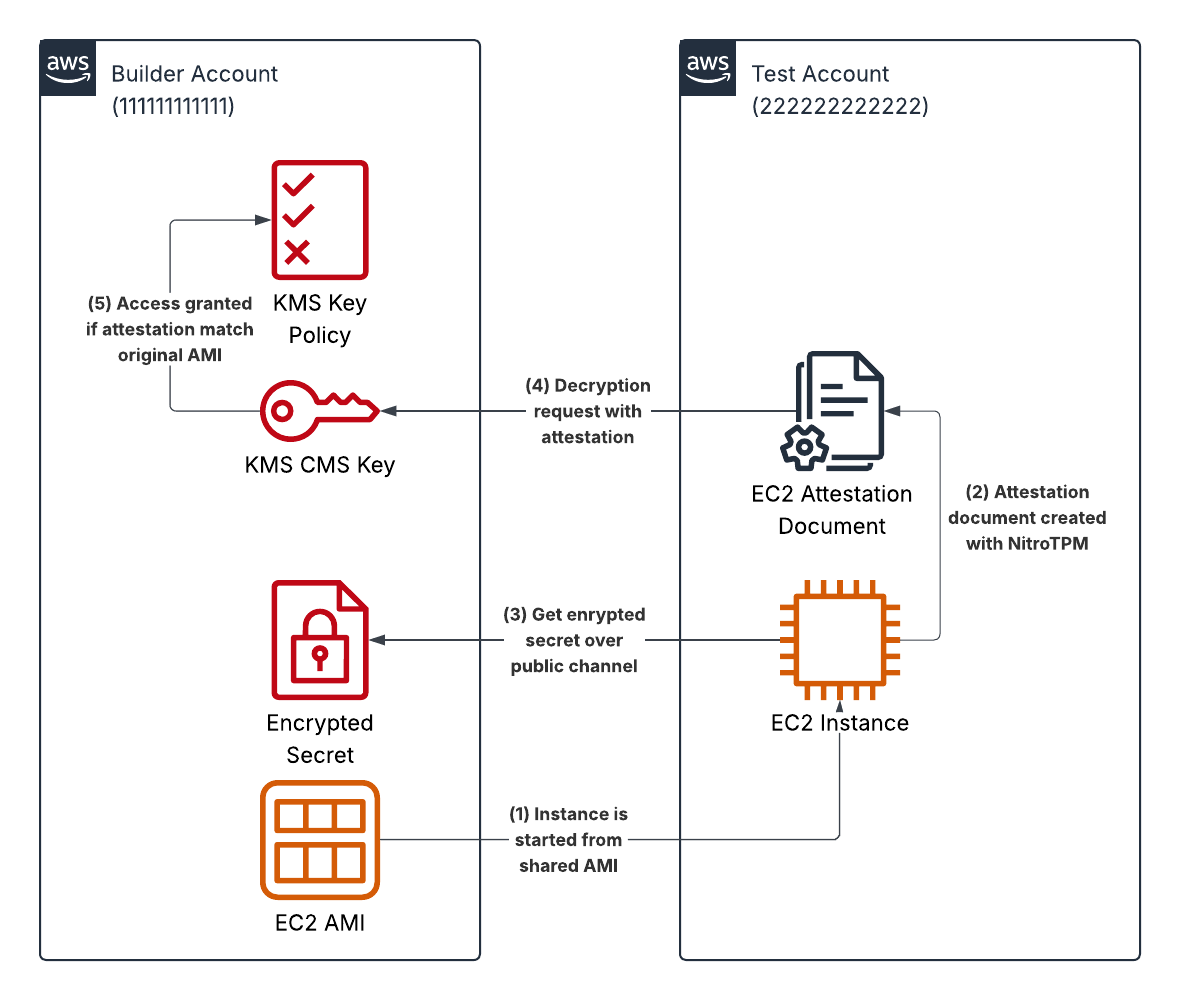
The diagram below shows the test scenario across two AWS accounts:
- Builder Account owns the attestable AMI, the KMS CMS key, and the encrypted secret. This is your account as the SaaS vendor.
- Test Account represents the customer’s account where your product will actually run.
- Instance launch — The test account starts an EC2 instance from the AMI shared by the builder account. Because the AMI is attestable, NitroTPM measures the boot chain into PCR registers.
- Attestation document — On the running instance, NitroTPM produces a signed attestation document containing the current PCR values and a public key supplied by the caller.
- Fetch encrypted secret — The instance retrieves the encrypted secret over a public channel. The ciphertext is not sensitive on its own — it can only be opened with the KMS key in the builder account.
- Decryption request — The instance calls kms:Decrypt against the builder account’s KMS key, attaching the attestation document as the recipient.
- Policy evaluation — The KMS key policy compares the PCR values in the attestation document to the expected values from the original AMI build. If they match, KMS returns the plaintext wrapped with the public key from step 2, so only the attested instance can unwrap it.
The secret is delivered into the customer’s account but never visible to the account administrator - only to a process running on an instance booted from an AMI the builder built and measured.
EC2 Instance Types with NitroTPM
Even though NitroTPM is widely supported by EC2 instance families, not all families have it,
and not all regions have all families. You can find this info from AWS documentation and
AWS API using aws ec2 describe-instance-types but it is a bit clumsy. So I wrote a utility
script to list NitroTPM supported EC2 families in given region
when no arguments are given, or list available instance types when one or multiple families
are specified in cmd line.
% export AWS_REGION=eu-north-1
% ./ec2-tpm-support.sh
c: c5 c5a c5d c5n c6g c6gd c6gn c6i c6in c7a c7g c7gd c7i c7i-flex c8g c8gn
g: g4dn g5 g6 g6e g6f
gr: gr6 gr6f
hpc: hpc6a hpc6id hpc8a
i: i3en i4i i7i i7ie i8g i8ge
inf: inf1 inf2
m: m5 m5d m6g m6gd m6i m6idn m6in m7a m7g m7gd m7i m7i-flex m8g
p: p5 p5e p5en
r: r5 r5b r5d r5dn r5n r6g r6gd r6i r6idn r6in r7a r7g r7gd r7i r8g
t: t3 t4g
u: u7i-12tb u7i-6tb u7i-8tb u7in-24tb
x: x2idn x2iedn x8aedz x8g x8i
% ./ec2-tpm-support.sh c7g m5
c7g: c7g.12xlarge c7g.16xlarge c7g.2xlarge c7g.4xlarge c7g.8xlarge c7g.large c7g.medium c7g.xlarge
m5: m5.12xlarge m5.16xlarge m5.24xlarge m5.2xlarge m5.4xlarge m5.8xlarge m5.large m5.xlarge
Attestable AMI
To use EC2 attestation not just any AMI works. I need to build an attestable AMI. This is an AMI for which I have PCR hash values. PCRs (Platform Configuration Registers) are TPM slots that accumulate hashes of each step in the boot chain. They can’t be written directly — only extended — so the final values are a tamper-evident fingerprint of exactly what booted. KMS can use these values to decide whether to allow decrypting the secret.
To simplify the build process I wrote a template that creates an EC2 instance with either an x86 or arm64 CPU using the latest Amazon Linux 2023 AMI. Instance can be accessed with SSM Session Manager.
AMI build starts by installing required packages …
dnf install -y \
  kiwi-cli python3-kiwi kiwi-systemdeps-core \
  qemu-img veritysetup erofs-utils git cargo \
  kiwi-image-descriptions-examples
Then I build coldsnap utility, which simplifies AMI build process by skipping snapshotting a running instance step. Coldsnap pulls in aws-sdk-ec2, which takes a while to compile and needs 16 GB of RAM. This is the reason build-template is using r7*.large instance.
git clone https://github.com/awslabs/coldsnap.git && (cd coldsnap && cargo install --locked coldsnap)
For my demo case, I’m using the sample appliance description that comes with Kiwi,
with minor modifications to make it work better in the demo; I added openssl and tpm2-tools packages
and installed amazon-ssm-agent so I can login to instance and show secrets can be decrypted.
In real life you would not install ssm-agent as it would let account owner login to instance.
I’m skipping most of the image configuration details in this post but you can find more details in Kiwi documentation and Attestable AMIs & NitroTPM deep dive.
        <!-- NOTE: additional packages for demo -->
        <package name="openssl"/>
        <package name="tpm2-tools"/>
        ...
        <!-- Remove operator access by not installing these packages -->
        <!-- NOTE: SSM agent is installed for demo -->
        <ignore name="openssh-server"/>
        <package name="amazon-ssm-agent"/>
        <ignore name="cloud-init"/>
        <ignore name="cloud-init-cfg-ec2"/>
        <ignore name="update-motd" />
        <ignore name="ec2-instance-connect"/>
        ...
After modifying /usr/share/kiwi-image-descriptions-examples/al2023/attestable-image-example/appliance.kiwi
I was ready to build the AMI and get PCR measurements. If you’re wondering, the PCR measurements below are not from
a real AMI — they’re random hex strings ;-)
kiwi-ng system build \
  --description /usr/share/kiwi-image-descriptions-examples/al2023/attestable-image-example \
  --target-dir ./image

cat ./image/pcr_measurements.json
{
  "Measurements": {
    "HashAlgorithm": "SHA384",
    "PCR4": "a3f7c2e891b4d56f0a2c8e1d7b3f4956c0a8e2d1f7b394c5e6a0d2f8b1c4e7a3d5f6c8b0e2a4d7f1c3b5e8a0d2f4c6b9",
    "PCR7": "d2f8a1c4e7b390d5f2c6a8e1b4d7f0c3a5e9b2d6f8c1a4e7b0d3f6c9a2e5b8d1f4c7a0e3b6d9f2c5a8e1b4d7f0c3a5e9",
    "PCR12": "000000000000000000000000000000000000000000000000000000000000000000000000000000000000000000000000"
  }
}
Next I uploaded the snapshot and register AMI. I learned it the hard way to avoid throttlin and limit upload process using --workers 16 --omit-zero-blocks. If you still get throttling errors from AWS, you can tune it down further.
SNAPSHOT=$(~/.cargo/bin/coldsnap upload --workers 16 --omit-zero-blocks ./image/al2023*.raw)
ARCH=$(m=$(uname -m); [ "$m" = "aarch64" ] && m="arm64"; echo "$m")
aws ec2 wait snapshot-completed --snapshot-ids ${SNAPSHOT} || exit 1
aws ec2 register-image \
  --name "attestable-app-$(date +%Y%m%d-%H%M)" \
  --architecture ${ARCH} \
  --boot-mode uefi \
  --tpm-support v2.0 \
  --ena-support \
  --virtualization-type hvm \
  --root-device-name /dev/xvda \
  --block-device-mappings DeviceName=/dev/xvda,Ebs={SnapshotId=${SNAPSHOT}}
Then I shared the AMI with the AWS test account.
NOTE: Remember to terminate the build instance once the AMI is ready.
KMS Key Policy
Next I need a KMS key to encrypt and decrypt my secret. The focus is on the key policy that must allow all actions
from my builder account where the key is created, and allow decryption from remote accounts only if a correct
attestation document is provided. I wrote a template that takes PCR4 value (see above) as
input and creates a key (and alias) with proper policy. Take note of AttestationKeyAlias in stack output.
This is required later when testing.
    - Sid: AllowAttestedDecryptAnyAccount
      Effect: Allow
      Principal: '*'
      Action:
        - kms:Decrypt
        - kms:GenerateDataKey
        - kms:GenerateRandom
      Resource: '*'
      Condition:
        StringEqualsIgnoreCase:
          kms:RecipientAttestation:NitroTPMPCR4:  !Ref PCR4Value
          kms:RecipientAttestation:NitroTPMPCR12: '000000000000000000000000000000000000000000000000000000000000000000000000000000000000000000000000'
Testing
Let’s start by creating an EC2 instance on test account (one that doesn’t have KMS key). This instance must support NitroTPM and can not be T-series because of a limitation in TPM. I wrote a template to help set up an instance with SSM Session Manager access (remember ssm was deployed to AMI for testing). Use AMI ID from build account that was shared earlier.
Encrypting
On build account I use the KMS to encrypt a secret. Take note of encrypted $BLOB. Use key alias id from KMS stack output.
SECRET="Hello World"
B64=$(echo "$SECRET" | base64)
BLOB=$(aws kms encrypt --key-id arn:aws:kms:eu-north-1:111111111111:alias/sample-kms-key --plaintext ${B64} --query CiphertextBlob --output text)
Decrypting
Let’s start by verifying I can decrypt on build account where I encrypted my secret.
aws kms decrypt --key-id arn:aws:kms:eu-north-1:111111111111:alias/sample-kms-key --ciphertext-blob "${BLOB}" --query Plaintext --output text | base64 -d
Hello World
Above works only when called from build account. If I run the same on test account, key policy will prevent decryption with an error.
aws: [ERROR]: An error occurred (AccessDeniedException) when calling the Decrypt operation: User: arn:aws:sts::22222222222:assumed-role/OrganizationAccountAccessRole/user@example.com is not authorized to perform: kms:Decrypt on the resource associated with this ciphertext because the resource does not exist in this Region, no resource-based policies allow access, or a resource-based policy explicitly denies access
When I login to EC2 instance created from attested AMI on test account, I can decrypt the secret with attestation document. First let’s set some variables to hold encrypted data and define the KMS key alias for decryption. As the secret is now encrypted it can be shared over public channels to test instance.
CIPHERTEXT_B64="YOUR_ENCRYPTED_BLOB"
echo "$CIPHERTEXT_B64" | base64 -d > /tmp/ct.bin
KMS_KEY_ID="arn:aws:kms:eu-north-1:111111111111:alias/sample-kms-key"
Then I need an ephemeral key-pair for the decryption process. When called with --recipient, KMS won’t return plaintext
over the wire to an attested instance; instead it wraps the plaintext with the public key in the attestation document.
openssl genrsa -out /tmp/priv.pem 2048
openssl rsa -in /tmp/priv.pem -pubout -outform DER -out /tmp/pub.der
I created those into /tmp to keep data in memory even though this isn’t strictly necessary as my AMI boots to read-only filesystem with overlay so all writes are stored to instance memory and not written to EBS volume. The public key is sent to KMS inside the attestation document, where it’s used to encrypt the reply.
ATT=$(/usr/bin/nitro-tpm-attest --public-key /tmp/pub.der | base64 -w0)
NOTE: Attestation document is only valid for 5 minutes after it has been created. If you get error for expired document when decrypting with KMS, just rerun above to refresh.
Now I can decrypt the secret.
aws kms decrypt --key-id "$KMS_KEY_ID" \
  --ciphertext-blob fileb:///tmp/ct.bin \
  --recipient "KeyEncryptionAlgorithm=RSAES_OAEP_SHA_256,AttestationDocument=${ATT}" \
  --query CiphertextForRecipient \
  --output text | base64 -d > /tmp/wrapped.bin
KMS doesn’t return the plaintext directly — the secret arrives encrypted with the ephemeral key-pair I must decrypt with matching private key.
openssl cms -decrypt -inform DER -in /tmp/wrapped.bin -inkey /tmp/priv.pem
Hello World
Summary
The demonstration above showed how to deliver a secret to an EC2 instance in a remote AWS account without exposing it to the account owner. To keep the process secure do remember
- AMI containing the application must have all external access disabled. This includes inbound network access like sshd, SSM agent, and instance connect. Also cloud-init must be disabled to prevent user-data script from adding any access during the instance boot.
- PCR value used in KMS key policy must be kept secret. If it gets compromised, an attacker can create a valid attestation document and gain access to KMS key.
- You can (and should) limit access to KMS key only to your customer accounts. Sharing the key with everyone adds risk if PCR gets compromised.
- The AMI itself should not be considered secret — it’s trivial to create an EBS volume from it and attach it to an attacker-controlled instance. You can embed encrypted secrets in the AMI, but it’s not recommended: you’d need to update the PCR values in KMS policy every time the AMI changes.
- When processing the data you should never write plaintext secrets to disk but keep it in memory so an attacker can’t recover it from a EBS snapshot. Having read-only file system helps to keep data off the disk ;-)
- If you must store a secret data to a disk, use OS block level encryption such as LUKS. AWS native EBS encryption is not secure because it doesn’t support attestation.
You can find templates, scripts and other supporting documents from ec2attestation github repo. There is also further details on tampering the AMI and using encrypted file system. These were too much to be included in a single blog post. Also beware these were written with help from Claude and all details haven’t been verified.