
If you must have NAT, make it regional
Shortly after I published my post about how You don’t need NAT gateway to deploy Lambda into VPC, Amazon Web Services (AWS) announced iAmazon VPC Regional NAT Gateway. Whilst IPv6 eliminates the need for NAT entirely, Regional NAT Gateway represents a major update to best practices for IPv4 Amazon Virtual Private Cloud (VPC) networking.
Brief History of AWS NAT Solutions
First there were NAT instances. You’d spin up an Amazon Elastic Compute Cloud (EC2) instance with a special Amazon Machine Image (AMI), disable source/destination checks, point your route tables at it, and hope it didn’t fall over. Instance sizing, high availability, patching, monitoring - all yours to manage. It worked, but it was a high maintenance solution.
Late 2015 AWS announced Amazon VPC NAT Gateway. Fully managed, highly available, no patching required. Create it in a public subnet, add a route, job done.
In 2021 AWS added Private NAT Gateway to the mix. This one isn’t for Internet access but for connecting VPCs and other networks when you’ve got overlapping CIDR ranges. I wrote about how this enables more agile networking patterns that weren’t really feasible before.
And now, in November 2025, AWS announced Amazon VPC Regional NAT Gateway. Unlike traditional NAT Gateway that lives in a single Availability Zone (AZ), the regional variant spans multiple AZs. AWS handles the high availability and scaling for you.
Simpler
AWS services come in 3 flavours - zonal, regional and global. Zonal services live in a specific availability zone, whilst regional services span the entire region. And here’s the thing - they’re configured with network components that match their scope.
Classic NAT Gateway is a zonal service. You create it in a specific AZ, attach it to a subnet (which is also zonal), and it serves traffic for that AZ. If you want high availability, you must deploy another NAT Gateway in another AZ, with another subnet, and manage separate route tables for each AZ’s private subnets. It works, but you’re thinking about AZ topology every step.
Regional NAT Gateway makes this much simpler. It’s a regional service, so it attaches directly to your VPC that is a regional network construct. One NAT Gateway for the entire VPC, regardless of how many AZs you are using. Routing isn’t specific to availability zone any longer but works the same way as public subnets with an Internet Gateway. Just point the default route to the regional NAT Gateway and you’re done.
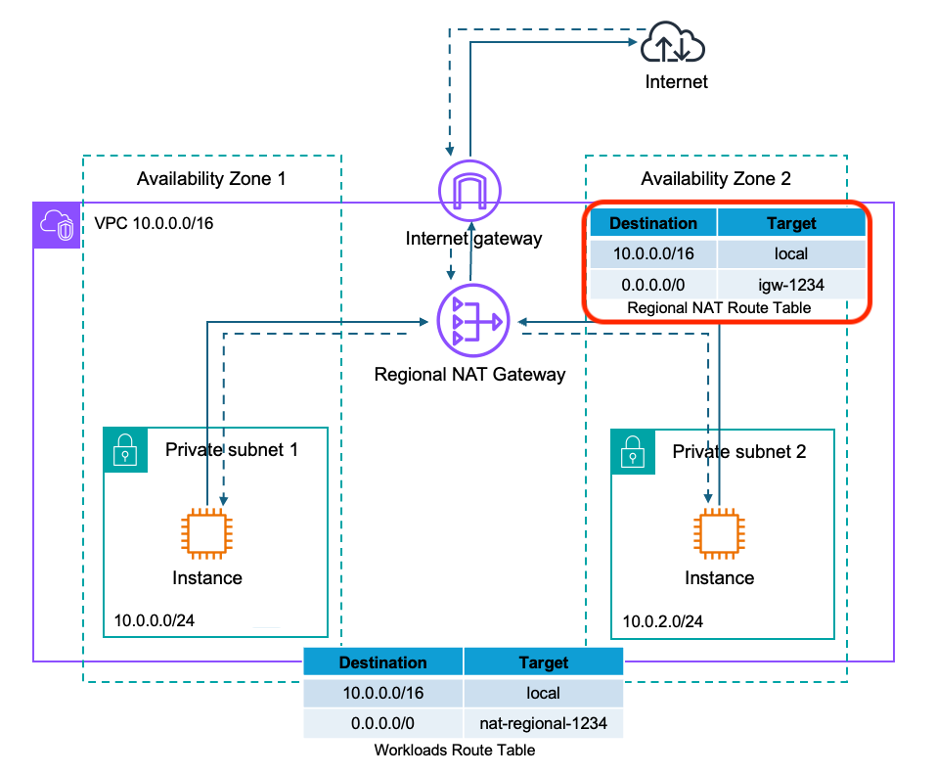
This is particularly nice if you don’t need any inbound connections from the Internet. Traditionally you’d still need public subnets for the NAT Gateways even though nothing was accepting inbound traffic. Now you can drop public subnets entirely and run a pure private subnet architecture. Simpler network topology, fewer moving parts.
Note there is one new component in above setup - the Regional NAT Route Table. It is created automatically with a pre-configured route to the Internet Gateway. But you can customize it to route to middleboxes like firewalls, enabling traffic inspection for outbound flows. See AWS blog post for more details.
NOTE: If you read my previous post about Lambda and IPv6, you might notice this looks very similar to IPv6 Egress Only Gateway. But you shouldn’t think Regional NAT gateway as IPv4 equivalent to IPv6 Egress gateway because it still does address translation that isn’t required when using IPv6.
More Secure
Public subnets are where things with public IPs live - load balancers, bastion hosts, anything that needs inbound connections from the Internet. If the only thing you have in public subnets are NAT gateways, then you don’t need them any more after switching to regional NAT gateway.
This matters for security because now you can’t expose something to the Internet by accident if there’s nowhere to expose it. No public subnets means no path for resources to get public IPs. Someone wants to make their database publicly accessible? Not happening - there is no subnet configuration that would allow it. It’s defence in depth through architectural constraint.
However, there is a small catch. You still need an Internet Gateway attached to your VPC. Regional NAT Gateway needs it for outbound connectivity, even though you’re not routing any traffic to it from your subnets. As the AWS documentation notes, when you create a regional NAT Gateway, AWS “automatically creates a route table for it, which comes with a pre-configured route to the internet gateway.” So the IGW must exist, but your private subnets never point routes to it.
Cheaper (?)
If you’re running traditional NAT Gateways in three AZs and thinking “brilliant, I’ll replace all three with one regional NAT Gateway and cut my costs by two-thirds” - this isn’t how it works :-(
Regional NAT Gateway pricing is per AZ, just like traditional NAT Gateway. The difference is it’s automatically scaling. When you have resources in three AZs using the regional NAT Gateway, you’re charged for three AZs.
The clever bit is what happens when your workloads change. Say you’re running a scheduled job that only uses two AZs during off-peak hours. So far you would be still paying for all three NAT Gateways. Regional NAT Gateway does adjust automatically. When no traffic flows through an AZ, you stop paying for that AZ. When traffic resumes, pricing scales back up.
So you’re not saving money if you’re running steady workloads across multiple AZs. You’re getting operational simplicity - one resource to manage instead of three - but you’re paying the same hourly charges. The cost benefit comes if your workloads are dynamic, expanding and contracting across AZs throughout the day.
There is also another way Regional NAT Gateway can save you money (and improve your resilience to AZ failures) - it prevents cross-AZ data transfers from misconfiguration. With traditional NAT Gateways, if you accidentally made route table in AZ-A to point to a NAT Gateway in AZ-B, you were paying cross-AZ data transfer charges on top of everything else.
Think of it this way - you’re trading the complexity of managing multiple NAT Gateways for the flexibility of automatic AZ scaling. The price stays the same for equivalent usage, but you’re getting operational simplicity and protection from costly misconfigurations.
Small Print
Scaling Out
Regional NAT Gateway can take up to 60 minutes to expand to new AZs. This isn’t at speed of EC2 Auto Scaling launching instances in 2-3 minutes or functions scaling in seconds, but it shouldn’t be a major issue because
Until this expansion is complete, the relevant traffic from this resource is processed across zones by your regional NAT Gateway in one of the existing Availability Zones.
Pricing
Regional NAT Gateway charges per AZ, but how is it detected if an AZ is “in use”? The documentation is bit vague but it seems to be based on presence of an elastic network interface (ENI) rather than traffic detection.
regional NAT gateway detects the presence of an network interface(ENI) in that Availability Zone and automatically expands to that zone. Similarly, the NAT Gateway contracts from the Availability Zone that has no active workloads.
Expansion to new AZ is said to typically take 15-20 minutes but can take up to 60 min. Documentation doesn’t say, but I would expect scale in from unused AZs to follow similar process. And if you stop your instance but ENI remains, I would expect that AZ remain “in use” from NAT point-of-view.
Public NAT Only
At launch regional NAT gateway does not support private NAT. For private NAT gateways you should continue to use classic zonal NAT gateways.
Summary
Regional NAT Gateway is what NAT Gateway should have been from the start.
Architectural & Operational simplicity - One NAT Gateway per VPC instead of one per AZ. No more managing multiple resources, no more AZ-specific route tables to keep synchronized. When workloads expand to new AZs, Regional NAT Gateway handles it automatically. For purely outbound architectures, you can eliminate public subnets entirely. Simpler network topology, fewer components to secure and maintain.
Protection from mistakes - No risk of misconfigured route tables causing cross-AZ data transfer charges. Traffic automatically routes through the NAT Gateway capacity in the same AZ as your resources.
Better capacity - Up to 32 IP addresses per AZ compared to 8 for classic NAT Gateway. Automatic IP scaling when connections approach limits. Better suited for shared NAT scenarios and high-connection workloads.
Cost efficiency for dynamic workloads - Only pay for AZs in-use. If your workloads scale across AZs throughout the day, you stop paying for idle NAT capacity.
Advanced routing options - NAT gateway route table enables traffic inspection through middleboxes like firewalls, something that required complex routing workarounds with classic NAT Gateway.
The pricing is the same for equivalent usage, so you’re not paying extra for these benefits. You’re getting operational simplicity, architectural flexibility, and protection from common misconfigurations at no additional cost.
There’s no compelling reason to deploy new classic NAT Gateways. Regional NAT Gateway is available in all commercial AWS regions. If you’re designing new VPCs or refactoring existing ones, make your NAT regional. And if you’re running classic NAT Gateways in production, start planning the migration. The architecture is simpler, the operations are easier, and you’re eliminating entire classes of configuration mistakes that cost money and cause outages.